
A homeowner standing in a tired bathroom does not want to ring a builder. They want to take three photos, send them, and get on with their evening. More and more of them do exactly that, and the app they send them on is WhatsApp.
Set up properly, WhatsApp Business for tradesmen is the easiest enquiry channel you will ever run: free, already on the homeowner’s phone, and built to answer the routine questions for you. Set up badly, it is your personal number buzzing through Sunday dinner. This guide covers the difference.
Your customers are already on it
Ofcom’s latest look at how the UK goes online puts WhatsApp in front of 90% of UK adults, one of the three most used apps in the country alongside Facebook and Google Maps (Ofcom Online Nation, December 2025). That is more people than use Google Search.
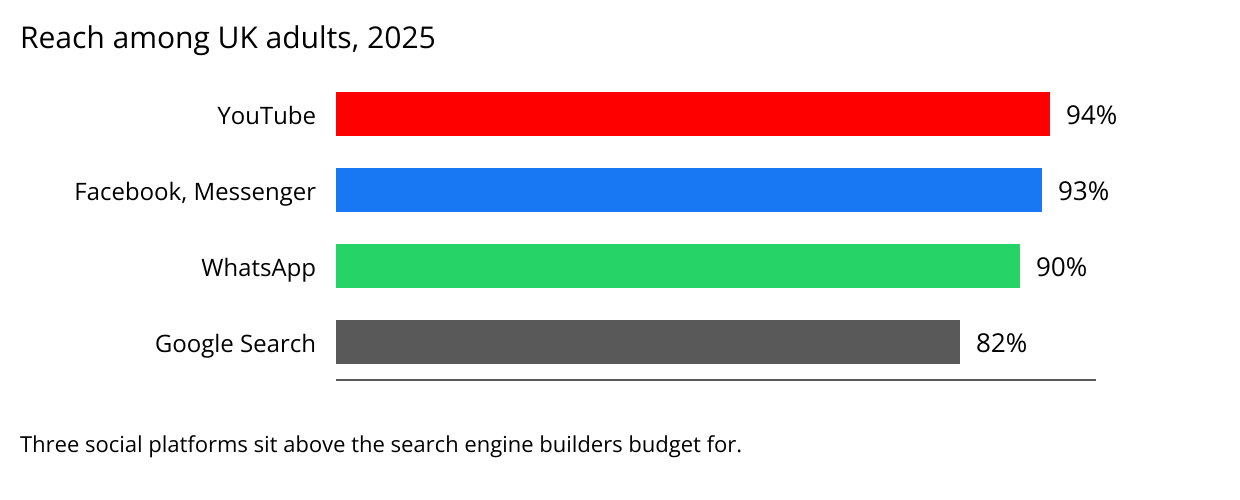
For a builder, that means no homeowner needs to download anything, create an account or learn a form to reach you. They open the app they used ten minutes ago to message their sister, and they send you the job.
WhatsApp or WhatsApp Business?
Among the fastest rising WhatsApp searches in the UK right now is “whatsapp vs whatsapp business”, up 400% (Google Trends, GB, rising related queries, retrieved 29 September 2026). Plenty of trades people are asking the same question, so here is the short answer.
The WhatsApp Business app is free and made for small businesses (WhatsApp). It works exactly like the WhatsApp you already know, with extra tools for a business: a proper profile, automatic greeting and away messages, saved replies and a way to sort your chats.
Two things to know before you install it:
- One number, one app. A phone number can sit on ordinary WhatsApp or on WhatsApp Business, not both at once. The simplest setup is a separate work number, so the business has its own account and your evenings stay yours.
- You almost certainly do not need the paid version. WhatsApp also sells a platform for medium and large firms with several numbers and teams answering messages, and that one charges for messages. A sole trader or a firm with a handful of vans is exactly who the free app is built for.
Set up the profile before the first message arrives
“whatsapp business profile best practices” is rising faster still, up 1,750% over the same period. The profile is the first thing a homeowner sees when they tap your name, so treat it like a shop front.
Fill in every field. The business name as it appears on your van. A description that says what you do and where: “Kitchen and bathroom refits across Leeds and Wakefield” tells a homeowner more than “Quality building services”. Your hours. A link to your website or your Google profile, so they can see your reviews. If you have not sorted that side yet, we covered it in Google Business Profile for builders.
The tools that do the typing for you
This is where the Business app earns its place, and where most trades people never go.
Greeting message. Sent automatically when someone messages you for the first time. Use it to ask for what you always need: “Thanks for getting in touch. Send a few photos of the job, your postcode and when you are hoping to start, and I will come back to you.”
Away message. Sent outside the hours you set. It tells the homeowner you have seen them and when you will reply, which means you can leave the phone in the van on a Saturday without losing the job.
Quick replies. Save the answers you type every week, then send any of them by typing a forward slash in the chat. Your rough lead time, what a survey visit involves, how you take a deposit. WhatsApp’s own guide suggests leaving room to personalise each one, so it never reads like a robot (WhatsApp).
Lists. Group your chats by where each job stands: New enquiry, Survey booked, Quote sent, Won. It is a simple pipeline inside the app, and it stops a good enquiry sinking under the group chat about Saturday’s football.
Photos before you get in the van
The real gift of the channel is the photos. A homeowner who sends three pictures and a short video of the job has told you most of what a first visit would. You can see whether it is your kind of work, spot the problem they have not mentioned, and give a rough idea of cost before anyone books a morning.
That is fewer wasted trips across town to price jobs you were never going to win, and more time on the ones you will.
When one phone is not enough
The free app has one weakness, and it shows up as the business grows. Everything lives on one phone.
Your enquiries do not all arrive on WhatsApp. Some come from your Facebook ads, some from the form on your website, some are missed calls and texts. When a second person starts answering, or you want to know which ad produced the job, a phone in your pocket cannot tell you. Enquiries get answered twice or not at all, and nobody can see the whole picture.
That is the point where WhatsApp wants to sit inside something bigger. Our CRM puts texts, WhatsApp messages and emails into a single inbox, tracks every enquiry back to the Meta or Google campaign that produced it, and turns your lists into a pipeline the whole team can see. We covered what happens after the first message in the follow up that wins the job; this is the channel that message arrives on.
Where we come in
We build that system for you, with WhatsApp set up alongside everything else so every enquiry lands in one place. You reply where the homeowner already is, from the phone or the office, without living on either.
If WhatsApp enquiries are already arriving and you are answering them from your personal number between jobs, get in touch. We will look at how enquiries reach you today and tell you plainly what would make them easier to handle.